Thursday, 11 April 2013

Blogs

What is a Blog?
A Blog is a specialised form of website that allows people to keep a online journal. In order to keep blogs up to date and interesting a system has been evolved by which makes it easier for people using blog sites to post material. The blog editor interface is connected to a database system that can manage posts and allows links to other articles/websites. Also allowing comments to made on posts and interlinked with that allows the mechanics of HTML to be used fluidly. This allows the 'journalist' to concentrate more on the content rather than the actual blog.
Blogs are now considered to be very important in a wider context, eg. group blogs are a big part of it because it is usually the central focus of discussing or promoting events, ideas and concepts.

My Example Blog
This is an example blog that I made specifically for this post to allow you to understand the functionality and ease of creating a blog using Blogger. There are many different blog sites that exist but my exam board require me to use Blogger.
First thing you want to be doing is going to the Blogger website by typing 'blogger' into Google and clicking on the top link that is highlighted in red on the screenshot below.


Once you have clicked on the link Highlighted in red it will take you onto the Blogger web page that allows you to either sign in or sign up. The sign up button is in the top left of the screen and on the screen shot it is circled in blue.


Once you have clicked on the sign up button it will take you to a page that will ask you create a Google account, this is because Google owns Blogger. You need to enter all your details and click on the blue button saying 'Next Step' in the bottom right corner of the grey box on the right where you entered your details. for my example I have made an account using the name Joey Cazzari.


Once you have clicked the blue button and created a Google account then it will take you to a page that resembles the screenshot below. From this page you can create a new blog, you do this by simply clicking the 'New Blog' button that is contained in the screenshot's blue circle.


Immediately on clicking the 'New Blog' button a square window will pop up in the middle of the screen that looks like the screenshot on the left and this is where you will enter basic details about your blog. Once you have entered relevant details then click the button circled by a blue ring to create your blog.
Upon being clicked Blogger will take you to the page that looks like the screenshot below. To confirm that you have created a new blog there should be a little message that appears that states exactly that and is circled in the screenshot with a blue ring. Then you want to click on 'Start posting' that is next to the confirmatory message.


Once you have clicked on 'Start posting' then you will be forwarded to a page that resembles the screenshot below, this where you write your posts. I have given the post a title and written relevant information in there that is related to my ICT course but you can write your preferred subject in this area. When satisfied that you post is ready you click the orange box that says 'Publish' that is in a blue circle in the screenshot.


When you have published your post you can then view it on your blog page by pressing 'View blog' that is circled in the above screenshot with a red ring.
Immediately on pressing 'View blog' it will take you to your blog page. Depending on what template you chose to begin with, it will appear and might look like the screenshot below. Nonetheless your post should be presented on your blog page as demonstrated below.


Open Universtity


History of the Open University
http://www.wessexscene.co.uk/wp-content/uploads/2010/02/open-university.jpg

The open university was founded in 1963 by the a politician called Harrold Wilson. He was the Labour Party Leader at the time and he was the person who imposed his vision about having a 'University of the Air'. Not long after this he wrote a report on Labour's higher education policy and without cabinet consultation he pushed his ideas out in speeches even though it was not party policy. This idea had been opposed by the civil service, BBC, his shadow cabinet and after time even his own cabinet but despite this he persevered with his idea. The Open University (OU) was actually opened in 1969, and did not resemble what Mr. Wilson first planned nonetheless it was still a great deal to him. Harold has always said that he felt that the OU was one of his greatest achievements.


Why it is Different from other Universities
'Through academic research, pedagogic innovation and collaborative partnership we seek to be a world leader in the design, content and delivery of supported open learning.' This was quoted from the OU website: http://www.open.ac.uk/about/main/the-ou-explained/the-ous-mission. This demonstrates and explains exactly what the Open University does. With supported open learning it allows people studying at the OU to be able to study for their degree whilst also fitting it around their normal life, this could be around their job or even for their job. It also specifies on a different page how they have always supported open learning, they tend to have online forum that you can refer to if you need help with a certain part of the degree study and there are always OU tutors at hand to help. They deliver supported open learning by providing high quality teaching materials and use professional logistics to deliver it to the students, there is also a locally based support centre in most towns and cities in the UK.

Students that The Open University has Taught
They claim to be the largest academic institution in the whole of the UK, they support their argument by saying they currently have around 240,000 students currently studying at the OU and to support these students there are 7,000 tutors, 1,100 full time academic staff accompanied by more that 3,500 support staff. The OU has 16,125 students that are studying directly with them oversees and they have 15 curriculum partnerships in 23 countries. 45% of students had one A level or lower at entry level. 31,000 students are under the age of 25 and they claim to be the largest provider of higher education for people with disabilities, the figure being around 17,000. Over 71% of OU students work full-time or part-time during their study time. No wonder they are so successful!

Tuesday, 5 March 2013

SMS - Has it's Time Passed

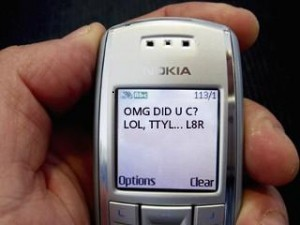
SMS was originally used in times of where long phone transmissions were slack so they were used as a form of short bursts of textual data but nowadays it is more a communication medium. The messages were meant to be kept short but made to be meaningful and as a result an SMS language has developed and evolved from this.

Here are some examples of SMS language, including some classic cell phone abbreviations:
1) My smmr hols wr CWOT
2) I wntd 2 go hm ASAP, 2C my M8s again
These SMS examples were taken from an English essay submitted by a 13 year old British teenager... At school... Seriously! And their meaning, of course is...
1) My summer holidays were a complete waste of time
2) I wanted to go home as soon as possible, to see my mates again
I could easily make up an SMS example or two, by removing vowels and shortening words as much as possible - lk ths, u c! - but I believe this genuine SMS example is of more educational value.
Information Copied From:http://ezinearticles.com/?SMS-Language---Some-Examples-of-Text-Messages-Including-Txt-Abbreviations&id=5812010

Niel Papworth was the first person ever to send a text message around this time 20 years ago. After that between then and now Billions of text messages have been sent around the world. Girls in general send around 221 text messages in a week compare to the average user. The age of users of mobile phones are becoming younger and younger, the average 8-11year old sends 41 texts a week and that is more than double over last years figures. Overall figures of text messages being sent has fallen from last year to this, this could be said to be caused by the fact that people tend to use other forms of communication opposed to texts like direct messaging on Facebook and Whatsapp.

Database Screenshots


Screenshot of the whole database with no restrictions or refinements.


Screenshot of the a refined search of finding records in the ‘Anglia/East’


Refined search for records of entry costs that are ‘£8.50 and less’ as well as the last refinement.


Search refined to the category ‘LA’ which is leisure category, this is as well as the other two refinements.


Screenshot of a search for Locations in ‘Bedford’ as well as the last 3 refinements.


Screenshot of the highlighted venue in which I picked.

Wednesday, 16 January 2013

Instant Messaging MS-End

MSN - Skype
This is the end of the long and bendy road of MSN Messenger. It is a shame to see the death of MSN as I myself once was a user, however Microsoft displayed nothing but common sense when they shut the MSN server down. A difference of 180 million users is a good enough reason to shut the live messenger down in favour of Skype regardless of if it angers many people.

http://www.nextpowerup.com/news/489/microsoft-shuts-down-msn-messenger-on-march-15.html
The users of MSN will not be able to sign into Messenger after March 15th 2013 giving them time to upgrade to Skype. When they migrate to Skype, all of their contacts will continue to work as before, and they will be able to use all the features Skype has. The president of Microsoft's Skype division Tony Bates said "We want to focus our efforts on making things simpler for users while continuing to improve the overall experience." MSN Messenger had a web-cam capable section to it where you could perform video calls and with transferring to Skype Microsoft has bettered its service.


http://www.digitaltrends.com/web/msn-com-down-including-hotmail/
Chat and Instant Messaging
Instant messaging has proved to be similar to email and the World Wide Web in that it's implementation for use as a form of business communication. It was driven primarily by individual employees using their own software at work, rather than it delivery by corporate IT departments. Tens of millions of the consumer IM accounts in use are being used for business purposes by employees of companies and other organisations. Instant messaging is a service where you can interact with others that you are speaking to in real time, this is much more private than a chat room as you are talking directly to the individual opposed to posting a comment that everyone can see as well as the person you are talking to. This stops people from seeing private conversations that you would like to have with an individual. Simple instant messaging services only allow a maximum of 2 people to chat with each other, otherwise more advanced services allow a group of people to chat, share images and files with each other. An example of this for now but will not be present in the future is MSN Messenger.
Instant messaging requires people to to be online to be able to speak to each other hence the fundamental part of it being in real time. The beauty about it being in real time but over a computer is it allows shy people to interact in a conversation in their own time and put their feelings and views in about it. However there is a downside to this real time instant messaging, one of them being that you cannot see the person you are talking to so as a result it means that the person could lie about their identity to cover up their real identity. This real identity could be a dangerous person like a paedophile which means it is easy for them to target a particular person. This identity cover up could cause these dangerous people to man make situations to encourage the individual to meet them. Also in the short time it takes to write a message it doesn't encourage long reflection which means an inevitable answer for the dangerous individual.


http://bgr.com/tag/skype/
Voice Over Internet Protocol
VOIP is very similar to instant messaging but instead of typing a conversation it is possible for a person to speak as they would on a telephone and have the option to stream a video. A lot of money can be saved on international phone calls if you use skype, this is because you are not charged to use the telephone service. However like IM the other person needs to be online for it to work because of the real time factor. VOIP can be used through both computers and smartphones, this means that you can do it at any time if the other person is online. To use it on the computer you will need a headset/speakers and a microphone to talk through, also if you want to stream a video between you both then you will require a web-cam. It is the same for a smartphone but you will need 3G Internet coverage. Last bust not least, if you are using a house phone then you will need to plug the phone into a router.
However there could be some potential drawbacks from using this usually free service, the main one being some of them do actually charge a monthly subscription to use their service. Another is that if you have a bad Internet connection then it can typically be slow to bring through the sound of the people speaking better known as Latency, this could cause frustration due to the possible misunderstanding of the person receiving. In relation to that if there is not an Internet connection due to the servers being down then it means no Internet calls can be made and equally if the VOIP server goes down then the same will happen.

Working Styles - Tool Man

John is a sales representative selling tools to garden centres and DIY stores. He travels 1000's of miles a months to see new and existing customers; he has always travelled around with a diary, an address book and large road atlases. He likes to be punctual but sometimes he finds it hard to locate new clients or gets stuck in traffic. Armed with a calculator and the robust but latest sales catalogue he travels to each client. He spends 6 hours a day for 4 days a week on the move, then an extra 2 hours on those days sorting that day's administration. Then on a Friday he spends it in the office to finalise all administration for the whole week.

http://androidandme.com/tag/htc-one-x-plus/
Personal Digital Assistant / Smartphone
A personal Digital assistant is different from a smartphone but that makes these two appliances differ from each other. The smartphone is able send and receive calls and texts. Apart from that factor they both perform the same tasks. Owning a smartphone would kill so many birds with only a large but ultra-thin stone! I am only going to focus on the appropriate capabilities to Johns situation.

Advantages
Already the fact of having a smartphone would then eliminate the annoying factor of having to carry around change to enable him to use payphones. It would be cheaper easier and more convenient if John had a mobile phone / smartphone. Having this smart phone would also eliminate the fact that he would need to carry a diary, an address book and a calculator. The beauty of having a smartphone is that already comes with a calender and organiser. For John it means he can store all of his appointments on the phone which means the need for lugging around a large diary will be unnecessary. On most smartphones the facility for being able to store details of people you know and with HTC it allows you to actually allows you to make a small address book for each contact in the phone-book. This includes allowing you to store email addresses of the individual, different number locations and as already mentioned the house address of the individual. This would be perfect for John because it would mean not having to carry an address book as well. As for the calculator the smartphone will generally have a basic calculator but with some they also provide you with a scientific as well. If not then a calculator can be downloaded from your phones app store. Owning a smartphone will definitely be beneficial for John as three rather large items that he would usually need to carry around will all be compacted down into something the size of a phone. Having all these capabilities on his smart phone will moreover speed business actions up and make John's actions more fluid.

http://www.inautonews.com/tomtom-products-now-available-in-mexico
GPS - Global Positioning System
A Global Positioning System was first used by the British army to help them locate enemy locations and also ease their job of moving over areas of ground which to them were not familiar. Nowadays it is more readily available to the general population and they are rather cheap compared to when they were first put out on the market.

Advantages
This piece of technology  would help John be punctual 99% of the time. If John prides himself on the fact that he likes to be punctual then he should put some money aside to purchase a GPS. The reason being it would help him be more punctual because it resolves both problems that are presented to him when driving to a new or existing client. The occasional awkward to find client won't be as much of a problem anymore due to the fact that if he put a client's postcode and house number in the GPS it will take him straight to the client's front door, no more trying to find the road in an area in which he has never been before. Also when stuck in traffic on the way to an existing client's house it probably frustrates John because he likes to be punctual but with the GPS he need not worry about this problem. A modern day Hi-Tec GPS can find out the route in which there is the most traffic a cut it out of the route, also if the route he is taking has suddenly become congested then the GPS can look for a new route that would cut the journey time. If John got a GPS then he would be happier and the preparation time for a route would be a lot less, it would also provide his customers with better customer service therefore potentially increasing his customer base.


http://www.2dayblog.com/2011/07/09/gateway-crams-14-screen-into-13-laptop/
Laptop
A laptop PC is a good bit of equipment to have when you run a business, in addition it is more useful than having a desktop PC. The reason for this is because it can easily be carried to destinations of clients and it is readily available for use. Laptops have been around for many years now at they are becoming more and more Hi-Tec, for a laptop to stay current it's advisable to get a laptop that is more advanced than for the time it is present. This way when years pass the technology incorporated stays Hi-Tec for longer.

Advantages
The amount of administration that John performs in a week would be dramatically decreased because he would be able to do it while he was with the client. This is because computers are usually good at finding a shorter or quicker way of performing tasks when as and when supplied with the right software. Also if John was to write documents out it would not be as neat as typing it up on the computer. Another reason why it would speed John's administration up is the fact that when he has created documents on each client it can be saved and stored on the laptop's hard drive therefore enabling him to retrieve that information at any time. As well as that with the right software he could download a catalogue onto his laptop which means there would be no need for him to carry around a robust catalogue around again reducing the amount of objects that he would usually carry around.


http://digitallearning.eletsonline.com/wp-content/uploads/2012/10/keene1.jpg
Internet
The Internet was first developed as a way of communication, and a method of sending data by the US military. It was specifically designed to not have a 'central' location.  It was developed in response to the USSR launching Sputnik into space. Nowadays the general public use the Internet whether it be for business purposes, just out of interest or even do your weekly shop! Also now you can get USB drive that you can put into your computer and it gives you Internet data from the service provider. These are called Internet Dongles.

Advantages
John would benefit a great deal from using the Internet. If he wanted to cut the amount of hours that he spends on the road a day then he could set up a website and put and online version of his catalogue on the website for his clients to look at any time they wanted. This would also save John carrying around a big catalogue with him and also it would save him money on printing as well. If his customers do not have an Internet enabled facility at their address then he would be able to take his laptop to them and use his Internet Dongle as a source of Internet and use it to show them the catalogue. If all else fails then he would always have his smartphone and contract to fall back on as that is able to go on the Internet through the phone's service provider.


http://cnanursingclasses.wordpress.com/tag/career-in-nursing/
Disadvantages of having the latest Technology
Along with most of the modern technology something is bound to go wrong. There are many things that could happen and stop John doing his job as efficient as what he would like. The most likely occurances would be an item of technology that he uses being broken in some way shape or form. This would be bad because having the latest and greatest technology is quite expensive and if anything got broken the it would be quite costly to get it fixed. Another unfortunate occurance could be that constant use of the internet could lead to a getting a virus or equivalent that could do serious damage to the computer. This would result in the computer having to be wiped of all its contents and there could be valuable information for John. It can be avoided by always backing up all information on his laptop but this sort of occurance always happens when you least expect it and takes you by surprise. With modern technology it needs to be constantly charged on a regular basis, this could be quite a hassle considering it should make Johns job easier. On the other hand he needs to ensure all of his electronics are fully charged before he leaves his house, either that or he would need to take chargers for each of his electrical appliences which is more matter to carry.

Tuesday, 8 January 2013

Death of the Argos Catalogue

With Advertisement on the Internet becoming a way of life as we progress through the 21st century, it has caused even a big company like Argos to consider wether their Catalogue is worth producing anymore.
Taken From: http://nedcolville.wordpress.com/2010/08/20/dear-argos-catalogue/
With the Argos Catalogue nearing its 40 year anniversary it is a shame to see the catalogue being put to rest with the last issue being autumn/winter 2012. it is also not really needed anymore because of the encouragement that Argos has given to its customers to shop online. over the last 2-3 years online shopping figures have rocketed therefore this action would have happened eventually. Also in this economically challenging time for businesses and survival, what better time for Argos to cut its costs opposed to it actually going bust for not moving with the times. However they will be putting a catalogue on their website to be up and running by the end of this year.
Other retail companies saw it be necessary that the catalogue that they provided their customers with was not as useful or profitable as what it used to be and this is another reason why they saw abolishing it a good idea. 
There are quite a lot of big companies that used to do a catalogue to display their items but they have seen online versions a better and cheaper way to go, one of the most well known is the Littlewoods catalogue. they used to produce a book with all their available items in it and they abolished making one because they put it on their website. one of the less known ones is Tesco, they tried a catalogue for a short spell to see how it would take off or supposedly not in this case as they found it not very popular and also it was around the time when they had just set up an online shop so they just scrapped the idea.
In some ways this online advertising and shopping is good because you are able to buy the product there and then and have it delivered to your own home so the convenience side of it has made life easier. Also the company save a hell of a load of money a year on not producing catalogues. On the other hand some people would prefer to look at a physical book that is holdable in their hands. Second to that, the digital divide also plays a part in this as it could stop people from being able to look in retail catalogues.